
代码仓库:https://gitee.com/tgwTTT/linux-learning-dai/tree/master/cookie/http-cookie-session
引言
众所周知:HTTP 协议本身是无状态的,服务器无法天然识别两次请求是否来自同一浏览器。为了维持“登录状态”“购物车”等连续性业务。
于是,业界引入了Cookie与Session两种会话跟踪技术
Cookie:
定义
HTTP Cookie(也称为Web Cookie、浏览器Cookie或简称Cookie)是服务器发送到⽤⼾浏览器并保存在浏览器上的⼀⼩块数据,它会在浏览器之后向同⼀服务器再次发起请求时被携带并发送到服务器上。通常,它⽤于告知服务端两个请求是否来⾃同⼀浏览器,如保持⽤⼾的登录状态、记录⽤⼾偏好等。
⼯作原理
当⽤⼾第⼀次访问⽹站时,服务器会在响应的HTTP头中设置 Set-Cookie 字段,⽤于发送Cookie到⽤⼾的浏览器。 ◦ 浏览器在接收到Cookie后,会将其保存在本地(通常是按照域名进⾏存储)。 ◦ 在之后的请求中,浏览器会⾃动在 HTTP 请求头中携带 Cookie 字段,将之前保存的Cookie信息发送给服务器。
分类
会话 Cookie(Session Cookie) :在浏览器关闭时失效。
持久 Cookie(Persistent Cookie) :带有明确的过期⽇期或持续时间,可以跨多个浏览器会话存在。
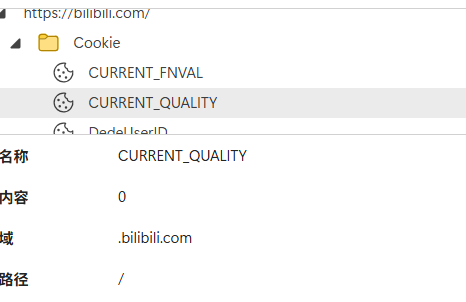
如果 cookie 是⼀个持久性的 cookie ,那么它其实就是浏览器相关的,特定⽬录下的⼀个⽂件。但直接查看这些⽂件可能会看到乱码或⽆法读取的内容,因为 cookie ⽂件通常以⼆进制或 sqlite 格式存储。⼀般我们查看,直接在浏览器对应的选项中直接查看即可。类似于下⾯这种⽅式:
| 属性 | 作用 | 示例 |
|---|---|---|
Expires/Max-Age | 持久化时间,缺省则为会话 Cookie,关闭浏览器即失效 | Max-Age=2592000(30 天) |
Domain | 控制哪些主机可以接收 Cookie | Domain=.example.com |
Path | 控制哪些路径可以携带 Cookie | Path=/admin |
HttpOnly | 禁止 JavaScript 读取,降低 XSS 风险 | HttpOnly |
Secure | 仅在 HTTPS 连接中传输 | Secure |
SameSite | 防 CSRF 的黄金标准 | SameSite=Strict/Lax/None |
安全性
由于 Cookie 是存储在客⼾端的,因此存在被篡改或窃取的⻛险。
⽤途:
⽤⼾认证和会话管理(最重要)
跟踪⽤⼾⾏为◦ 缓存⽤⼾偏好等
⽐如在edge浏览器下,可以直接访问:edge://settings/privacy/cookies
下面是代码举例(部分例子):
#pragma once
#include
#include
#include
#include
#include
#include
#include "TcpServer.hpp"
const std::string HttpSep = "\r\n";
// 可以配置的
const std::string homepage = "index.html";
const std::string wwwroot = "./wwwroot";
class HttpRequest
{
public:
HttpRequest() : _req_blank(HttpSep), _path(wwwroot)
{
}
bool GetLine(std::string &str, std::string *line)
{
auto pos = str.find(HttpSep);
if (pos == std::string::npos)
return false;
*line = str.substr(0, pos); // \r\n
str.erase(0, pos + HttpSep.size());
return true;
}
bool Deserialize(std::string &request)
{
std::string line;
bool ok = GetLine(request, &line);
if (!ok)
return false;
_req_line = line;
while (true)
{
bool ok = GetLine(request, &line);
if (ok && line.empty())
{
_req_content = request;
break;
}
else if (ok && !line.empty())
{
_req_header.push_back(line);
}
else
{
break;
}
}
return true;
}
void DebugHttp()
{
std::cout << "_req_line: " << _req_line << std::endl;
for (auto &line : _req_header)
{
std::cout << "---> " << line << std::endl;
}
}
~HttpRequest()
{
}
private:
// http报文自动
std::string _req_line; // method url http_version
std::vector _req_header;
std::string _req_blank;
std::string _req_content;
// 解析之后的内容
std::string _method;
std::string _url; // / /dira/dirb/x.html /dira/dirb/XX?usrname=100&&password=1234 /dira/dirb
std::string _http_version;
std::string _path; // "./wwwroot"
std::string _suffix; // 请求资源的后缀
};
const std::string BlankSep = " ";
const std::string LineSep = "\r\n";
class HttpResponse
{
public:
HttpResponse() : _http_version("HTTP/1.0"), _status_code(200), _status_code_desc("OK"), _resp_blank(LineSep)
{
}
void SetCode(int code)
{
_status_code = code;
}
void SetDesc(const std::string &desc)
{
_status_code_desc = desc;
}
void MakeStatusLine()
{
_status_line = _http_version + BlankSep + std::to_string(_status_code) + BlankSep + _status_code_desc + LineSep;
}
void AddHeader(const std::string &header)
{
_resp_header.push_back(header+LineSep);
}
void AddContent(const std::string &content)
{
_resp_content = content;
}
std::string Serialize()
{
MakeStatusLine();
std::string response_str = _status_line;
for (auto &header : _resp_header)
{
response_str += header;
}
response_str += _resp_blank;
response_str += _resp_content;
return response_str;
}
~HttpResponse() {}
private:
std::string _status_line;
std::vector _resp_header;
std::string _resp_blank;
std::string _resp_content; // body
// httpversion StatusCode StatusCodeDesc
std::string _http_version;
int _status_code;
std::string _status_code_desc;
};
class Http
{
private:
std::string GetMonthName(int month)
{
std::vector months = {"Jan", "Feb", "Mar", "Apr", "May", "Jun", "Jul", "Aug", "Sep", "Oct", "Nov", "Dec"};
return months[month];
}
std::string GetWeekDayName(int day)
{
std::vector weekdays = {"Sun", "Mon", "Tue", "Wed", "Thu", "Fri", "Sat"};
return weekdays[day];
}
std::string ExpireTimeUseRfc1123(int t) // 秒级别的未来UTC时间
{
time_t timeout = time(nullptr) + t;
struct tm *tm = gmtime(&timeout); // 这里不能用localtime,因为localtime是默认带了时区的. gmtime获取的就是UTC统一时间
char timebuffer[1024];
//时间格式如: expires=Thu, 18 Dec 2024 12:00:00 UTC
snprintf(timebuffer, sizeof(timebuffer), "%s, %02d %s %d %02d:%02d:%02d UTC",
GetWeekDayName(tm->tm_wday).c_str(),
tm->tm_mday,
GetMonthName(tm->tm_mon).c_str(),
tm->tm_year+1900,
tm->tm_hour,
tm->tm_min,
tm->tm_sec
);
return timebuffer;
}
public:
Http(uint16_t port)
{
_tsvr = std::make_unique(port, std::bind(&Http::HandlerHttp, this, std::placeholders::_1));
_tsvr->Init();
}
std::string ProveCookieWrite() // 证明cookie能被写入浏览器
{
return "Set-Cookie: username=zhangsan;";
}
std::string ProveCookieTimeOut()
{
return "Set-Cookie: username=zhangsan; expires=" + ExpireTimeUseRfc1123(60) + ";"; // 让cookie 1min后过期
}
std::string ProvePath()
{
return "Set-Cookie: username=zhangsan; path=/a/b;";
}
std::string ProveOtherCookie()
{
return "Set-Cookie: passwd=1234567890; path=/a/b;";
}
std::string HandlerHttp(std::string request)
{
HttpRequest req;
req.Deserialize(request);
req.DebugHttp();
lg.LogMessage(Debug, "%s\n", ExpireTimeUseRfc1123(60).c_str());
HttpResponse resp;
resp.SetCode(200);
resp.SetDesc("OK");
resp.AddHeader("Content-Type: text/html");
// resp.AddHeader(ProveCookieWrite()); //测试cookie被写入与自动提交
// resp.AddHeader(ProveCookieTimeOut()); //测试过期时间的写入
// resp.AddHeader(ProvePath()); // 测试路径
resp.AddHeader(ProvePath());
resp.AddHeader(ProveOtherCookie());
resp.AddContent("helloworld
");
return resp.Serialize();
}
void Run()
{
_tsvr->Start();
}
~Http()
{}
private:
std::unique_ptr _tsvr;
};
当它收到GET请求时会反序列化识别uname和password并做业务处理,并在响应报文中添加header Set-Cookie
但是我们看到cookie是存在很大的安全风险的,所以我们引入了Session
Session
工作原理
- 客户端首次访问时,服务器创建会话对象,生成唯一
sessionId。 - 通过
Set-Cookie: JSESSIONID=abc123; HttpOnly; Secure; SameSite=Lax把 ID 写回浏览器;或采用URL 重写(?jsessionid=abc123)。 - 浏览器后续请求携带该 ID,服务器根据 ID 在内存/Redis/数据库中检索会话数据。
存储方式
内存:Tomcat、Express 默认;重启即失效。
Redis:高性能、可水平扩展;支持过期策略。
数据库:可靠性高,但性能差;适合低频后台系统。
优点
敏感数据仅存服务端,客户端无法直接窥探。
可存任意结构化对象,无 4 KB 限制。
缺点
占用服务器资源,用户量大时需要分布式缓存。
默认依赖 Cookie,若浏览器禁用 Cookie 需退化为 URL 重写,体验差。
分布式场景下要解决会话粘滞(Sticky Session)或共享存储。
下面是实现代码:
#pragma once
#include
#include
#include
#include
#include
#include
#include
#include "TcpServer.hpp"
#include "Session.hpp" // 引入session
const std::string HttpSep = "\r\n";
// 可以配置的
const std::string homepage = "index.html";
const std::string wwwroot = "./wwwroot";
class HttpRequest
{
public:
HttpRequest() : _req_blank(HttpSep), _path(wwwroot)
{
}
bool GetLine(std::string &str, std::string *line)
{
auto pos = str.find(HttpSep);
if (pos == std::string::npos)
return false;
*line = str.substr(0, pos); // \r\n
str.erase(0, pos + HttpSep.size());
return true;
}
void Parse()
{
// 解析出来url
std::stringstream ss(_req_line);
ss >> _method >> _url >> _http_version;
// 查找cookie
std::string prefix = "Cookie: "; // 写入: Set-Cookie: sessionid=1234 提交: Cookie: sessionid=1234
for (auto &line : _req_header)
{
std::string cookie;
if (strncmp(line.c_str(), prefix.c_str(), prefix.size()) == 0) // 找到了
{
cookie = line.substr(prefix.size()); // 截取"Cookie: "之后的就行了
_cookies.emplace_back(cookie);
break;
}
}
// 查找sessionid
// sessionid=1234
prefix = "sessionid=";
for (const auto &cookie : _cookies)
{
if (strncmp(cookie.c_str(), prefix.c_str(), prefix.size()) == 0)
{
_sessionid = cookie.substr(prefix.size()); // 截取"sessionid="之后的就行了
// std::cout << "_sessionid: " << _sessionid << std::endl;
}
}
}
std::string Url()
{
return _url;
}
std::string SessionId()
{
return _sessionid;
}
bool Deserialize(std::string &request)
{
std::string line;
bool ok = GetLine(request, &line);
if (!ok)
return false;
_req_line = line;
while (true)
{
bool ok = GetLine(request, &line);
if (ok && line.empty())
{
_req_content = request;
break;
}
else if (ok && !line.empty())
{
_req_header.push_back(line);
}
else
{
break;
}
}
return true;
}
void DebugHttp()
{
std::cout << "_req_line: " << _req_line << std::endl;
for (auto &line : _req_header)
{
std::cout << "---> " << line << std::endl;
}
}
~HttpRequest()
{
}
private:
// http报文自动
std::string _req_line; // method url http_version
std::vector _req_header;
std::string _req_blank;
std::string _req_content;
// 解析之后的内容
std::string _method;
std::string _url; // / /dira/dirb/x.html /dira/dirb/XX?usrname=100&&password=1234 /dira/dirb
std::string _http_version;
std::string _path; // "./wwwroot"
std::string _suffix; // 请求资源的后缀
std::vector _cookies; // 其实cookie可以有多个,因为Set-Cookie可以被写多条,测试,一条够了。
std::string _sessionid; // 请求携带的sessionid,仅仅用来测试
};
const std::string BlankSep = " ";
const std::string LineSep = "\r\n";
class HttpResponse
{
public:
HttpResponse() : _http_version("HTTP/1.0"), _status_code(200), _status_code_desc("OK"), _resp_blank(LineSep)
{
}
void SetCode(int code)
{
_status_code = code;
}
void SetDesc(const std::string &desc)
{
_status_code_desc = desc;
}
void MakeStatusLine()
{
_status_line = _http_version + BlankSep + std::to_string(_status_code) + BlankSep + _status_code_desc + LineSep;
}
void AddHeader(const std::string &header)
{
_resp_header.push_back(header + LineSep);
}
void AddContent(const std::string &content)
{
_resp_content = content;
}
std::string Serialize()
{
MakeStatusLine();
std::string response_str = _status_line;
for (auto &header : _resp_header)
{
response_str += header;
}
response_str += _resp_blank;
response_str += _resp_content;
return response_str;
}
~HttpResponse() {}
private:
std::string _status_line;
std::vector _resp_header;
std::string _resp_blank;
std::string _resp_content; // body
// httpversion StatusCode StatusCodeDesc
std::string _http_version;
int _status_code;
std::string _status_code_desc;
};
class Http
{
private:
std::string GetMonthName(int month)
{
std::vector months = {"Jan", "Feb", "Mar", "Apr", "May", "Jun", "Jul", "Aug", "Sep", "Oct", "Nov", "Dec"};
return months[month];
}
std::string GetWeekDayName(int day)
{
std::vector weekdays = {"Sun", "Mon", "Tue", "Wed", "Thu", "Fri", "Sat"};
return weekdays[day];
}
std::string ExpireTimeUseRfc1123(int t) // 秒级别的未来UTC时间
{
time_t timeout = time(nullptr) + t;
struct tm *tm = gmtime(&timeout); // 这里不能用localtime,因为localtime是默认带了时区的. gmtime获取的就是UTC统一时间
char timebuffer[1024];
// 时间格式如: expires=Thu, 18 Dec 2024 12:00:00 UTC
snprintf(timebuffer, sizeof(timebuffer), "%s, %02d %s %d %02d:%02d:%02d UTC",
GetWeekDayName(tm->tm_wday).c_str(),
tm->tm_mday,
GetMonthName(tm->tm_mon).c_str(),
tm->tm_year + 1900,
tm->tm_hour,
tm->tm_min,
tm->tm_sec);
return timebuffer;
}
public:
Http(uint16_t port)
{
_tsvr = std::make_unique(port, std::bind(&Http::HandlerHttp, this, std::placeholders::_1));
_tsvr->Init();
_session_manager = std::make_unique();
}
std::string ProveCookieWrite() // 证明cookie能被写入浏览器
{
return "Set-Cookie: username=zhangsan;";
}
std::string ProveCookieTimeOut()
{
return "Set-Cookie: username=zhangsan; expires=" + ExpireTimeUseRfc1123(60) + ";"; // 让cookie 1min后过期
}
std::string ProvePath()
{
return "Set-Cookie: username=zhangsan; path=/a/b;";
}
std::string ProveSession(const std::string &session_id)
{
return "Set-Cookie: sessionid=" + session_id + ";";
}
std::string HandlerHttp(std::string request)
{
HttpRequest req;
HttpResponse resp;
req.Deserialize(request);
req.Parse();
// req.DebugHttp();
// std::cout << req.Url() << std::endl;
// 下面的代码就用来测试,如果你想更优雅,可以回调出去处理
static int number = 0;
if (req.Url() == "/login") // 用/login path向指定浏览器写入sessionid,并在服务器维护对应的session对象
{
std::string sessionid = req.SessionId();
if (sessionid.empty()) // 说明历史没有登陆过
{
std::string user = "user-" + std::to_string(number++);
session_ptr s = std::make_shared(user, "logined");
std::string sessionid = _session_manager->AddSession(s);
lg.LogMessage(Debug, "%s 被添加, sessionid是: %s\n", user.c_str(), sessionid.c_str());
resp.AddHeader(ProveSession(sessionid));
}
}
else
{
// 当浏览器在本站点任何路径中活跃,都会自动提交sessionid, 我们就能知道谁活跃了.
std::string sessionid = req.SessionId();
if (!sessionid.empty())
{
session_ptr s = _session_manager->GetSession(sessionid);
// 这个地方有坑,一定要判断服务器端session对象是否存在,因为可能测试的时候
// 浏览器还有历史sessionid,但是服务器重启之后,session对象没有了.
if(s != nullptr)
lg.LogMessage(Debug, "%s 正在活跃.\n", s->_username.c_str());
else
lg.LogMessage(Debug, "cookie : %s 已经过期, 需要清理\n", sessionid.c_str());
}
}
resp.SetCode(200);
resp.SetDesc("OK");
resp.AddHeader("Content-Type: text/html");
// resp.AddHeader(ProveCookieWrite()); //测试cookie被写入与自动提交
// resp.AddHeader(ProveCookieTimeOut()); //测试过期时间的写入
// resp.AddHeader(ProvePath()); // 测试路径
resp.AddContent("helloworld
");
return resp.Serialize();
}
void Run()
{
_tsvr->Start();
}
~Http()
{
}
private:
std::unique_ptr _tsvr;
std::unique_ptr _session_manager;
};
当收到一个sessionid时,在服务器端进行认证,并返回。
今天的更新就到这里如有错误欢迎指出

评论
还没有任何评论,你来说两句吧!