弱网环境的搭建以及lan、wan口的转变
很久没有没有更新博客了,有无工作需求,我们需要一些弱网环境,自己琢磨之后分享出来
材料:一个刷完机的openwrt 路由器
第一步:安装tc工具:
ssh root@10.0.0.1
opkg update
# 安装 tc 和 netem 内核模块
opkg install tc-tiny kmod-netem kmod-ifb

# 验证安装
tc -V# 输出:tc utility, iproute2-6.3.0
第二步:确定网卡名
ip addr show
第三步:直接模拟弱网环境
| 场景 | 命令 |
| 4G 一般 | tc qdisc add dev eth1 root netem delay 50ms 15ms loss 0.5% |
| 4G 弱网(地铁) | tc qdisc add dev eth1 root netem delay 150ms 50ms loss 3% |
| 5G 弱网 | tc qdisc add dev eth1 root netem delay 80ms 30ms loss 1% |
| 极端弱网(电梯) | tc qdisc add dev eth1 root netem delay 300ms 100ms loss 5% |
| 关闭弱网 | tc qdisc del dev eth1 root |
具体参数解析:
tc qdisc add dev eth1 root netem delay 50ms 15ms loss 0.5%
| 参数 | 作用 | 示例值 |
tc | Traffic Control,Linux 流量控制工具 | – |
qdisc | Queueing Discipline,队列规则 | – |
add | 添加规则 | del = 删除,change = 修改 |
dev eth1 | 作用在 eth1 网卡上 | eth0、wlan0、pppoe-wan |
root | 挂在根队列上(所有流量都经过) | parent 1:1 = 挂在某个子类上 |
netem | Network Emulation,网络模拟模块 | 专门模拟延迟、丢包、抖动 |
delay 50ms | 每个数据包延迟 50 毫秒再发送 | 50ms、150ms、300ms |
15ms | 抖动:实际延迟在 35~65ms 之间随机波动 | 基础延迟 ± 抖动范围 |
loss 0.5% | 随机丢弃 0.5% 的数据包 | 0.5%、3%、5% |
查看规则
tc qdisc show dev eth1
测试延迟和丢包
ping -c 20 223.5.5.5
效果如下:
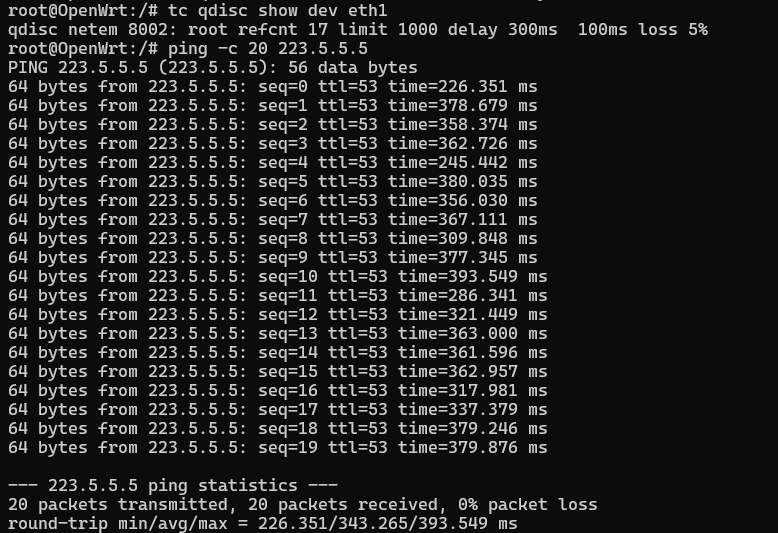
延迟和抖动明显
将WAN设置为LAN
将wan口改为lan口:
cat > /root/wan_to_lan.sh << 'EOF'
#!/bin/sh
uci delete network.wan
uci delete network.wan6
uci set network.@device[0].ports='lan1 lan2 lan3 eth1'
uci commit network
/etc/init.d/network restart
echo "eth1 已改为 LAN 口"
EOF
chmod +x /root/wan_to_lan.sh
恢复:
cat > /root/lan_to_wan.sh << 'EOF'
#!/bin/sh
uci set network.@device[0].ports='lan1 lan2 lan3'
uci set network.wan=interface
uci set network.wan.device='eth1'
uci set network.wan.proto='dhcp'
uci set network.wan6=interface
uci set network.wan6.device='eth1'
uci set network.wan6.proto='dhcpv6'
uci commit network
/etc/init.d/network restart
echo "eth1 已恢复为 WAN 口"
EOF
chmod +x /root/lan_to_wan.sh
查看是否更改:
uci show network.@device[0]
效果:
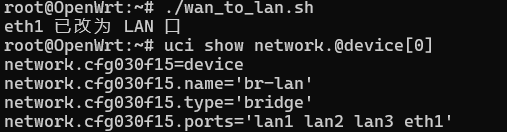
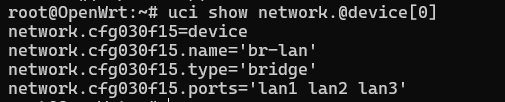
脚本:均在root目录下